Enhancements:
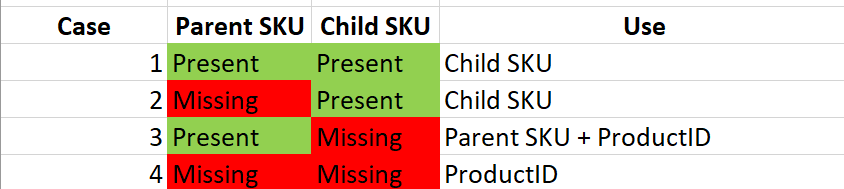
1.Missing SKU codes – Some sites do not explicitly set SKU codes. WooCommerce stores products using a ProductID as the primary key which means that it can have a many-to-one relationship with SKU. Xero on the other hand uses the SKU as the primary key so can only be a one-one mapping. For WC variable products this means there will be no parental heirarchy and a simple flat parent code plus child codes.
- SKU’s supplied in WC for both parent and children or children alone – Xeroom will use these SKU codes to create new products in Xero if they don’t exist.
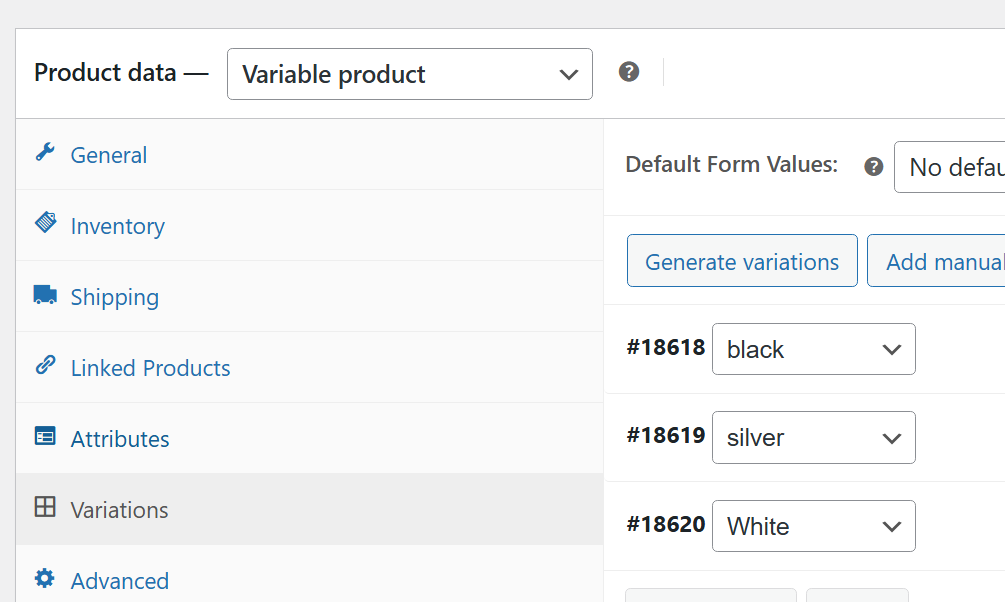
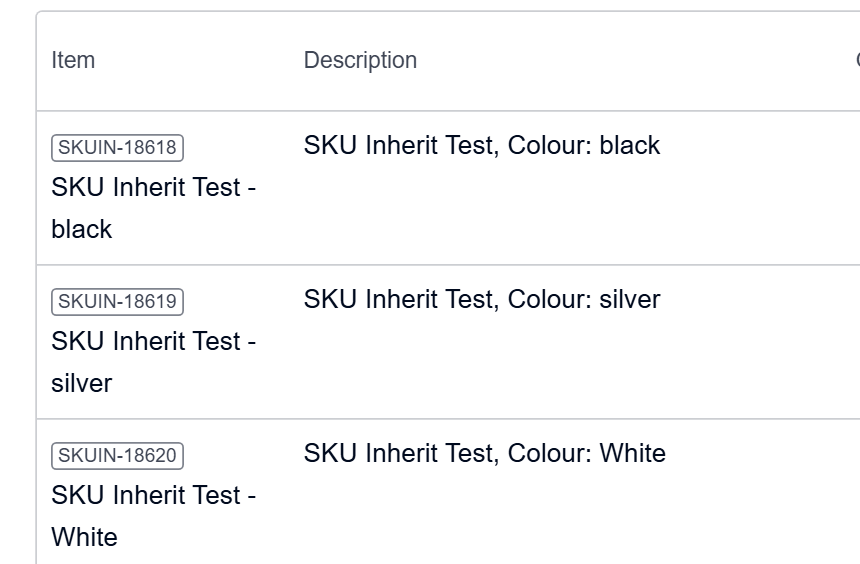
- If only the parent SKU code exists then it will be used and the children’s Product ID added as a suffix – see example below with the product in WC and their matching products in Xero.
- If neither the parent or children have SKU codes – Just the variant Product ID will be used. These are summarised in the table below:
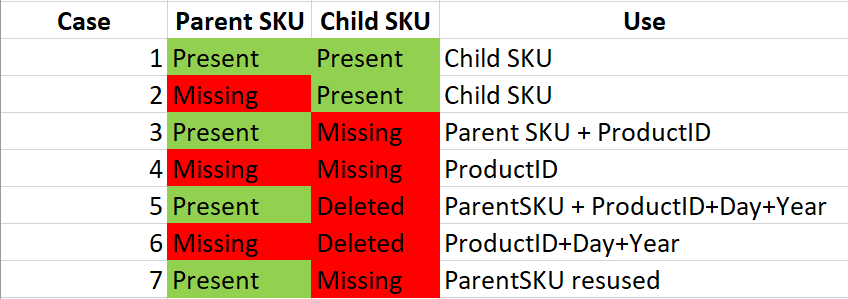
2 Deleting SKU codes in variable products, impact on order posting when using Inventory synch and out-of-stock in Xero – If inventory is being used for orders and set to use Xero as the master then any products that are down to zero in Xero will prevent an order from posting. Previously, deleting the SKU meant no matching item in Xero, so a new (untracked) item was created and the order could post. Now the product is linked to an existing Xero item (by product ID or SKU). If that item is tracked and has 0 stock, Xero/plugin blocks the order with an out-of-stock message.
A temporary work around is to suspend inventory synch for orders by setting it to None in the General Settings of Xeroom. This release however, will allow the SKU in the parent or children to be deleted which will trigger a new product to be created in Xero thus permitting the order to post when inventory synch is set to be on.
The new setting is shown below. This will create a new product code in Xero by taking the Product ID (and parent SKU if it exists) and adding a suffix comprised of the day and year to the code in Xero to avoid confusion of the same or similar products. Note that the new products created in Xero will not be set to be tracked by Xeroom this will need to be done by the user if required for inventory synch.
3. Use parent SKU only – Where no variation suffix is needed and one Xero code can be used for all variations such as in the PW Giftcard plugin. Using this option allows the order to post when otherwise an “Item code is not valid” error would occur.

This makes a total of 7 cases that Xeroom can now handle missing SKUs of children for:
3. Use Xero Descriptions – Option to use the product descriptions in Xero for invoices which is useful where you have long descriptions set in WooCommerce in order to be SEO friendly but inappropriate for use on invoices.

4. PW Giftcard Plugin - Compatibility added for buying cards and making payments with them.
5. Use Xero descriptions - Option to use these instead of WooCommerce one as WC can be too long due eg due to being SEO friendly.

6. Company Name Address mapping – ContactID error – Rewritten code to cover case of duplicate email addresses in Xero for this setting.

7. WooCommerce Wholesale Prices Premium By Rymera - Compatability added.
8. Decimal inventory in Synchs - Support added for non-integer quantities in WooCommerce. Note that native WC does not provide decimal inventory but a number of plugins add this capability. Xero does support decimal inventory. Now they can be synchronized between the two.
Was this article helpful?
That’s Great!
Thank you for your feedback
Sorry! We couldn't be helpful
Thank you for your feedback
Feedback sent
We appreciate your effort and will try to fix the article